A Web Designers Guide to Information Architecture

This is a special guest post from Jeff Foster – co-founder of WebBizIdeas, a company providing website development and e-commerce web design.

Web Design and information architecture go together like peas and carrots. Whether you have an information architect to work with or you are flying solo, a basic understanding of the interaction between the two is a fundamental in designing successful websites. Design is a layering process, and a general understanding of information architecture (IA) is pivotal to web designers seeking to excel in their craft. Information architecture is a fundamental cornerstone of a successful website – employing its principles ensures that the site’s users will experience functionability, ease of navigation, and easily discoverable content.

Information architecture is a fusion of arts and science that encompasses research, library science, computer science, graphic design, and psychology and then applies them to the design or build of a website. Designers should be vividly aware of the role information architecture plays in the planning, concept, and design/redesign stages of their projects.

There are certain IA concepts that a designer should always be aware of including the purpose of the site and its intended audience; the organization of the site in relation to the site’s content, labeling of pages, and its navigation schematics. Planning and executing the structural design of site information is necessary and must be viewed from the perspective of obtaining maximum ease of use and intuitive access to content.

Purpose and Mission

Getting a good grasp of you or your client’s intent and goals for the site is key. Web designers should ensure that they are intimately aware of the client’s mission statement, objectives, organizational culture and brand. This first layer is pivotal for it is the basis of the site’s design. The intended audience is another item that should be taken into account at the beginning of the project. The demographics and culture of the intended audience is an important consideration when it comes to laying out of the content and how the navigation scheme is set up. Without this initial purview a site could be wonderfully designed but ineffective for the client’s needs.

Organization of Content

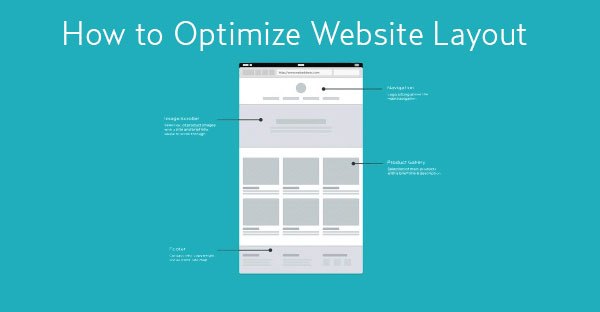
The structure and classification of content will directly impact a user’s ability to actually find and manage the information within the site. Whether you are doing a redesign or designing from scratch you should have a good grasp of the types of content that will be included in the site ahead of time. Organization choices should be made only after an in-depth content inventory is conducted, after the wireframe or blue print visual diagram or site map has been sketched that allows the designer to get a good visual of possible content and structure scenarios. Some basic models for content organization are:

• All in one: the simplest model, all content will be accessible from the same home page;

• Flat: pages are peers and interchangeably accessible;


• Index: based on the flat structure, but provide additional content in the telephone book style;

• Daisy: design for sites that need a workflow pattern of a linear nature- basically returns users to a certain point on the site after they’ve completed a task;

• Categorical strict hierarchy: content on lower level pages can only be accessed via the parent page; and

• Multidimensional hierarchy: provides users with multiple ways of browsing the same content.

Navigational Schemes

Designers have to put themselves in the position of the intended audience when making navigational design choices. Ask yourself, how are most people going to make their way through the site and how can you make it as easy as possible for them to do so? Effective navigational design should at the least do the following:

• Ensure that users are always aware of their location within the site; this allows them to easily browse forward or backwards;

• Hyperlinks should be distinctly set out from content such that they are easily discernable;

• Informing users of where they will be moving to upon clicking the hyperlink;

• Allowing for the usability and availability of the browser back button; and

• Seek to provide the audience with a minimum clicks to get maximum results.

Labeling

Labeling of sites pages must be done in a logical way that reflects the websites actual content and organization directives. A good way to do this is to make the site map reference CSS compatible. Similar to the cataloging concepts of a library, a site map should clearly define relationships between pages and reflect the similarity between the pages in a meaningful way- i.e. by content type, alphabetically, in phases or in relation to the websites geography.

A smart web designer must balance his or her talent for design with the science of what the website is being designed for. Understanding the principles of information architecture and integrating them with the principles of web design is a key skill.

header image copyrighted by OiMax

Catalin is the founder of Mostash - a social marketing boutique - and he's always happy to share his passion for graphic design & social media.

 
Inspired Mag recommends Elegant Themes - 69 brilliant WordPress themes for only $39!
Backup Buddy

Each of the 69 premium WordPress themes from Elegant Themes comes expertly coded in valid XHTML and CSS, and all are made compatible with the latest version of WordPres. Eeach template performs flawlessly in each of the most widely used browsers to ensure maximum functionality. Furthermore, all sidebars are made widget ready for your convenience.

  • Cross-browser compatibility guaranteed
  • Intuitive theme options page gives you control
  • A focus on support and community
  • Frequent theme additions and upgrades
Find out more about Elegant Themes

Comments

  • Nagarjun Palavalli July 26, 2010

    Nice article. Would be nice if you went a little more in detail though.

  • Nils Geylen July 30, 2010

    Is there no book? Would indeed love some more detail, esp. from a designer’s POV like you do here.

  • nikos lianeris July 31, 2010

    nice article!Information architecture is a key concept of a website’s success and and must be taken into account!

  • Brett Widmann January 9, 2011

    I really enjoyed reading this article. It has a lot of great tips to take into consideration. Thanks for sharing.

Leave a Reply

Trackbacks

Hosted By

7,247 Friends & Subscribers

Newsletter

Signup for our newsletter

Ads

Aff Ads

Elegant Themes
My Recommended Hosting Service
Try Market Samurai now for free!

Ads 2

Recent Comments

  • Lee Croxon: On a personal note I feel the time has come to expand on the way we build and develop websites, iPad and...
  • aledesign.it: Blu is one of my preferite colours. Thanks for sharing “Souljade” is nice design and I like...
  • Johny: Almost necessary to have PulseLA and Instagram now. Two great social media apps in addition to many...
  • Stacy David Wallingford: Great resource bundle! Thanks for sharing.
  • Rebecca Haden: I’m a fan of G+, but I haven’t been impressed with the photo editing or display options....
  • Secunoid: Great article, how about adding +1 button to your site?
  • Harbie Nepacena: Vimeo and skype are my favorite sites. They are very useful and convenient.
  • Web design Wolverhampton: Some very nice examples. Blue is such a great colour for a website: striking, but not too...
  • roy: Actually these sites are really nice, but most of the time feel some difficulties in loading entire site due to...
  • CJ Cook: Does anyone have a copy of CloserLook WP Theme or know how I can obtain one? The link no longer works and my...
  • Susan Pipolo: http://brunoswifey.tumblr.com/ I always follow back<3 this pretty much explains my life

skyscraper

Evanto

Smashing Network